
 RSS feed
We’ve added powerful comment tools to help you stay connected and in control of the conversations you care about. Whether you’re a regular commenter or want to follow the discussion silently, here’s how it all works:
Get Notified When Someone Replies to You

When you leave a comment, you’ll now see a bell icon next to the “Post Comment” button. Click it to be notified when someone replies to your comment. It’s a great way to stay in the loop without constantly checking back.
Subscribe to Comment Threads

You can follow entire comment threads even if you don’t want to post anything yourself.
Just click the “Subscribe” button above the comment box to choose:
- “Notify me of new comments on this post”
- “Notify me of replies to my comments only”
Enter your email, confirm your subscription, and you’ll get updates right in your inbox.
Follow or Unfollow Other Users
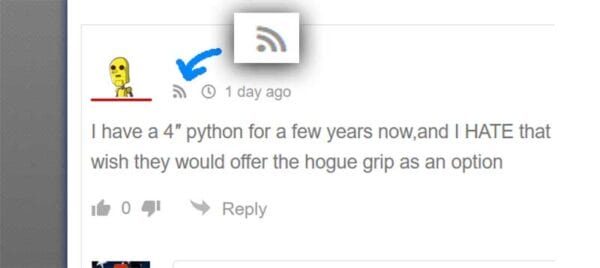
Want to keep up with what a specific commenter is saying across the site? You can now follow users and get email alerts every time they post a new comment.
To follow someone:
- Click the red-on-hover “Follow” icon next to their name.
- If you change your mind, click it again to unfollow.
Note: You need to be logged in to use this feature.
Manage or Cancel Subscriptions
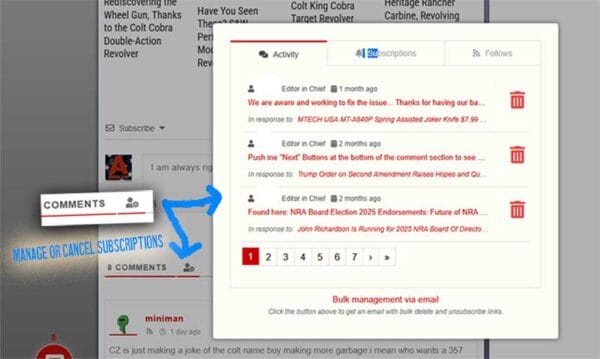
You can view and manage all your subscriptions through the “My Content and Settings” popup. It shows what posts or users you’re subscribed to and gives you the option to unsubscribe at any time.
Guests (non-logged-in users) can also unsubscribe! Just click “Cancel all comment subscriptions”, and you’ll get an email with a link to remove your subscriptions safely.
️ Add a Profile Picture with Gravatar
Want your comment to show a picture instead of a blank icon?
Here’s how to get your avatar:
- Go to Gravatar.com and sign up with the same email you use to comment.
- Upload a profile image.
- It will automatically appear on all WordPress-supported sites like AmmoLand News!
Note: Due to caching, it may take a little while to show up.
Need Help or Have Questions? Feel free to reply to this post with questions.
Let’s keep the conversation rolling — on your terms!